

If you play Cookie Clicker, you might have heard of the hidden cheat mode often called open sesame cookie clicker. This secret mode unlocks a debug panel that gives you powerful tools to change the game. The phrase open sesame cookie refers to the method by which players open the hidden debug interface in Cookie Clicker. Once active, you can manipulate cookies, upgrades, seasons, and other internal mechanics. This cheats-style mode is built into the game itself. A
How to Activate Open Sesame Cookie Clicker?
You can activate open sesame cookie clicker in two main ways, depending on whether you’re playing in a browser or using a modified/Steam version.
Method 1: Using Bakery Name (Browser Version)
In the browser version of Cookie Clicker, you can trigger the debug mode by editing your bakery’s name. Append the phrase saysopensesame (without quotes) to your bakery name. For example, change “My Bakery” into “My Bakery saysopensesame”. If done right, a green cookie icon or debug indicator appears.
Once the icon appears, click it to open the debug panel. That is the open sesame cookie clicker interface. To disable it, remove the added text, save, and refresh. For more gaming insights, updates, and fun cheat discoveries, explore Lekulent a hub where players dive into hidden tricks and advanced gameplay experiences.
Method 2: Console Command (Browser or Dev Mode)
Another way to enable open sesame cookie is to use the browser’s developer console. Open the console (usually via F12 or Ctrl+Shift+I / Ctrl+Shift+K), then enter:
Game.OpenSesame();
When you execute this command, the debug panel appears just as in the name method. On Steam or desktop versions, you may need to enable a developer or “DEV” mode in the game files (for example, editing a start.js file) to allow console access.
What Features Does Open Sesame Cookie Clicker Offer?
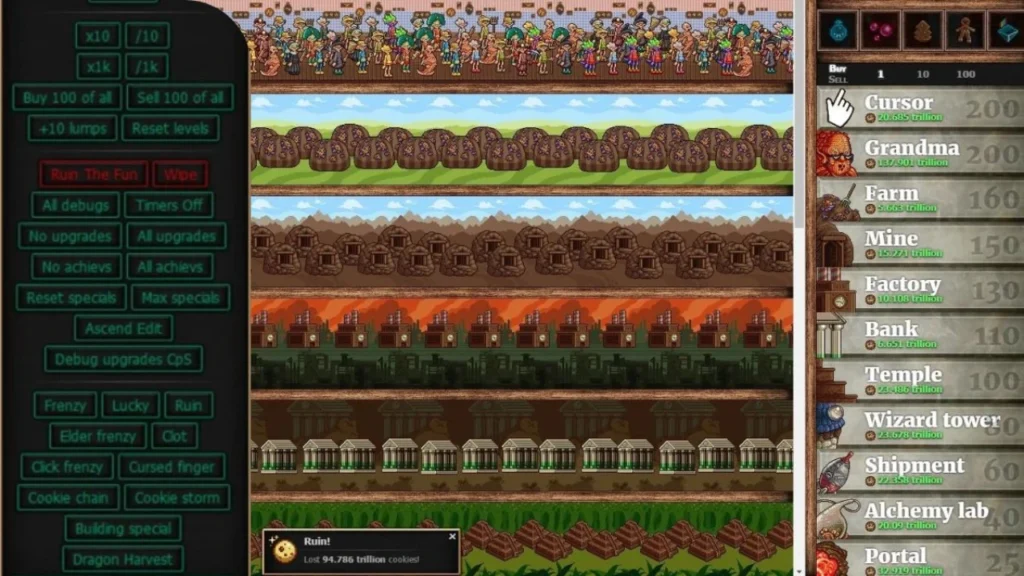
Once open sesame cookie is active, you gain access to many powerful tools. These let you experiment with the game’s mechanics, skip normal progression, or even break things. Use them carefully. Here is a table summarizing some of the key debug upgrades or features you unlock:
| Feature / Debug Upgrade | What It Does |
|---|---|
| Ultrascience | Speeds up research so that new researches take only 5 seconds. |
| Gold Hoard | Makes Golden Cookies appear much more frequently. |
| Neuromancy | Allows toggling of upgrades on or off in the Stats menu. |
| Eternal Seasons | Lets seasons last forever rather than switching. |
| Magic Shenanigans | Multiplies cookie production (e.g. ×1,000) while active. |
| Occult Obstruction | Reduces cookie production to zero (a “fun” break mode). |
| Turbo-charged Soil | Makes garden plants grow every second |
In addition to those, the open sesame cookie clicker panel lets you spawn Golden Cookies manually, force seasons, adjust cookie counts, unlock upgrades, and more. One special command is Ruin The Fun, which gives you all upgrades, achievements, and a massive cookie boost instantly.
Benefits of Open Sesame Cookie
When players activate open sesame cookie, they unlock a world of creative possibilities. It gives control over nearly every part of the game, helping both new and advanced players understand Cookie Clicker’s inner mechanics.
- Instant Progress – Players can skip grinding by adding unlimited cookies, upgrades, and achievements in seconds.
- Learning Tool – It helps players test strategies, farms, and upgrades before using them in normal gameplay.
- Event Simulation – Users can trigger events like Christmas or Halloween instantly without waiting for seasons.
- Debugging Aid – It assists modders and testers in checking new versions or updates without long waits.
- Customization – Players can design unique play styles, such as super-fast cookie growth or golden cookie storms.
- Stress-Free Gameplay – It removes time pressure, letting players relax and experiment freely.
- Access to Hidden Features – It exposes developer tools that reveal how the Cookie Clicker system truly works.
- Unlimited Creativity – You can reshape the game world—alter speeds, production, and effects—to your liking.
Risks of Open Sesame Cookie
While the debug mode offers freedom, it also carries some serious drawbacks. Misuse can ruin game balance or even damage your progress permanently.
- Loss of Achievement Progress – The game flags your save as “cheated,” disabling achievements permanently.
- Save Corruption – Using multiple debug toggles at once may crash or corrupt your save file.
- Reduced Fun – When everything is unlocked instantly, the sense of progress and challenge disappears.
- Permanent Changes – Some debug features cannot be undone once triggered, even after disabling the mode.
- Technical Errors – Entering wrong console commands may break the game or cause glitches.
- Cheating Label – Steam or online leaderboards mark such saves as modified, affecting your credibility.
- Unintended Effects – Certain debug tools can create endless cookie generation loops that slow the game.
- Difficulty Restoring Normal Mode – Once active, some features may persist unless you reload or reset the save.
Step-by-Step Example: Enabling and Using Open Sesame Cookie Clicker
Let me walk you through a simple example step by step:
- In the browser version, click on the bakery name to rename it.
- Add saysopensesame at the end of the name.
- A green cookie or FPS counter appears at the top left — that signals open sesame cookie clicker is active.
- Click that icon to open the debug panel.
- Inside, toggle one debug upgrade, for example Gold Hoard, making Golden Cookies spawn frequently.
- Watch your cookies shoot upward.
- If you want to disable debug, remove the “saysopensesame” addition, save, and refresh. Some toggled effects persist until turned off manually.
If you’re using the console method instead:
- Open Dev Tools (F12 or Ctrl+Shift+I).
- Navigate to the Console tab.
- Type
Game.OpenSesame();and press Enter. - The debug panel appears.
- Use it as above.
If playing via Steam or offline, you may need to set a “DEV = 1” value in a script file (like start.js), then relaunch the game. That unlocks the console and lets you run Game.OpenSesame(). For more gaming tweaks, developer tricks, and hidden console commands, check out Www thinkofgamescom a space dedicated to exploring game mechanics and modding tips for curious players.
Tips and Best Practices
- Always make a backup of your save before using open sesame cookie clicker.
- Don’t toggle all debug features at once — test small ones first.
- Use console commands only if you understand what they do (e.g.
Game.cookies = 1000000). - Be aware that some debug features are permanent or sticky — turning off the name trick might not disable everything.
- If achievements stop working, check whether the game flagged your save as “cheated” due to open sesame cookie usage.
- Use the mode for learning, experimenting, or fun, rather than replacing normal gameplay.
Conclusion
The hidden mode known as open sesame cookie clicker gives you access to a powerful debug panel inside Cookie Clicker. You can unlock it by appending saysopensesame to your bakery name (browser version) or by invoking Game.OpenSesame() in the console (if console access is allowed). Once active, it lets you toggle debug upgrades, spawn events, change cookie counts, and more.
While open sesame cookie unlocks many possibilities, it carries risks. Overuse can corrupt your game, disable achievements, or remove the challenge that makes the game fun. Always backup before using it. Use it as a sandbox or experimental tool rather than a shortcut all the time.
